Solitaire Spellbook: Card Game
- 4.9
- Rating
- 100.00K
- Installs
- Free
- Price
 Analysis by App-foxy
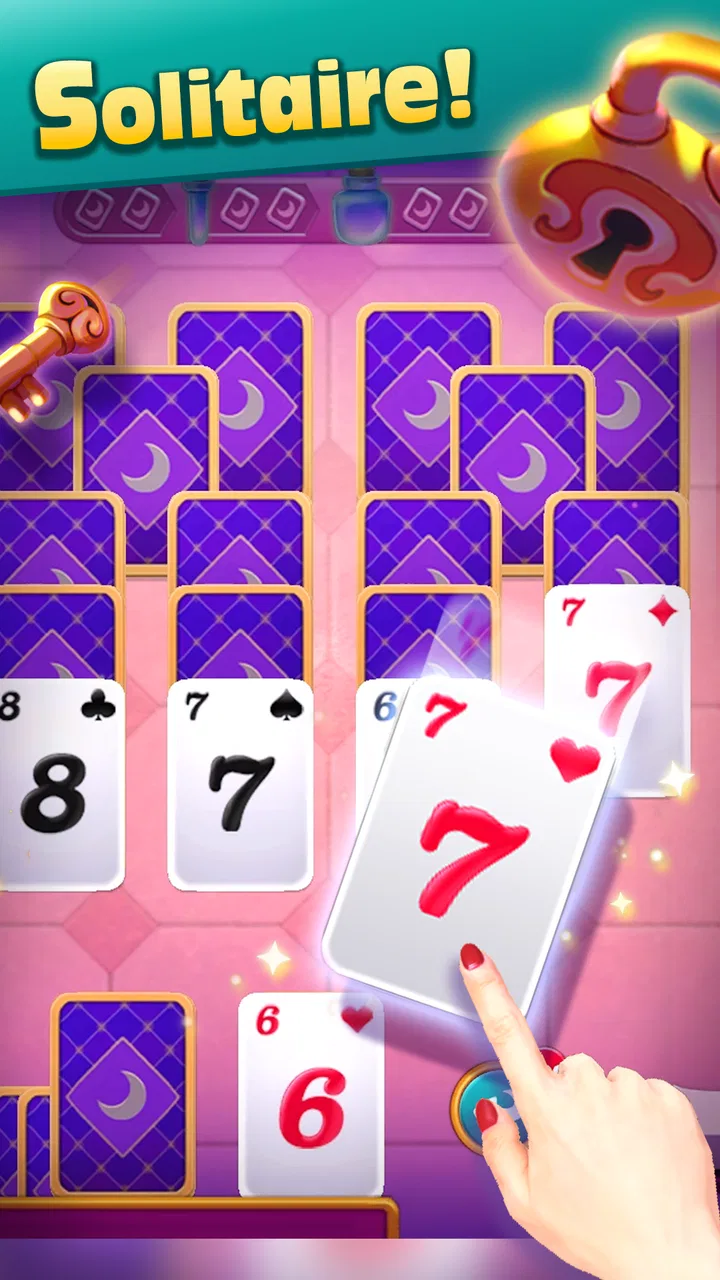
I spent time with Solitaire Spellbook: Card Game as a quiet, easy-to-pick-up card game rather than something designed to demand constant attention. That distinction matters. The basic appeal is familiar solitaire, but the spellbook presentation gives the experience a more focused identity than a plain deck-and-table layout. I can see myself opening it for a short break, playing while waiting, or settling into several rounds when I want something calm and self-contained.
It is a free game from SpadeThree, available to an Everyone audience, with optional in-app purchases ranging from $0.99 to $99.99 per item. Its strong 4.9 average from around 3.1 thousand ratings and more than 100 thousand installs suggest that the concept has found a receptive audience. I would still treat those numbers as a starting point rather than a substitute for personal taste: solitaire players who want a simple, low-pressure card routine are the most likely to enjoy it.
How the game feels during ordinary play
The first thing I noticed is how naturally solitaire fits into short sessions. There is no need to gather other players, learn a long rulebook, or prepare a team. I can start a round when I have a few spare minutes and stop when my attention moves elsewhere. That makes the game useful in situations where a more demanding title would be inconvenient, such as a commute, a coffee break, or the final few minutes before bed.
You May Also Like

 Blood Strike: 2.5 Anniversary
Blood Strike’s Loadouts Turn Every Drop Into a Tactical Gamble
A close look at Blood Strike’s custom loadouts: how fast access to signature weapons reshapes its battle royale rhythm, rewards preparation, and narrows the gap between fights.

 Pandora - Music & Podcasts
Pandora’s Music Is Easy to Start, but Harder to Recover
Pandora’s strength is its low-effort path from a seed to a station. Its weak spot is how much confidence it asks you to place in connection, setup, and quiet recovery.

 8 Ball Pool
8 Ball Pool Is Built on Rivalries, Rematches, and Routine
A close look at the rivalries, rematches, shared routines, and unanswered safety questions that turn a quick pool match into a persistent mobile community.

 Samsung Music
Samsung Music’s Quiet Strength Is Playing What You Already Own
Its reach comes less from spectacle than from dependable access to a personal library. That simplicity is both the app’s strongest retention engine and its ceiling.

 AccuWeather: Weather Radar
AccuWeather Review: A Quick, Clear Forecast for Everyday Decisions
For everyday plans, the best forecast is the one you can understand quickly. AccuWeather makes rain timing, radar, and local conditions easy to act on, with a few trade-offs.

 Hill Climb Racing
Why Hill Climb Racing Still Turns Crashes Into One More Run
A tiny car, a bumpy hill and one more upgrade: Hill Climb Racing keeps resurfacing because its simple chaos makes every near-miss feel personal.
More From Our News Desk
View All News


The spellbook theme also changes the mood. Traditional solitaire apps often aim for a neutral, office-like presentation, while this one frames the card activity as something a little more playful and atmospheric. I would not choose it for competitive card battles or deep strategy, but I appreciate that it gives a familiar format a reason to feel distinct.
For someone new to solitaire, the attraction is its approachable structure. The rules are easier to absorb than those of many collectible card games, and the game category is immediately clear. For an experienced solitaire player, the question is less about learning and more about whether this particular presentation feels pleasant enough to replace a preferred classic app. My answer is cautiously positive, especially if you want a themed version rather than the most bare-bones implementation.
What to expect from speed in short sessions
Solitaire is naturally suited to quick play because each action is small and the board is easy to revisit. I found the experience best approached as a sequence of brief decisions instead of a long campaign. That makes perceived speed depend less on dramatic action and more on how quickly I can read the layout, move cards, and continue without unnecessary interruption.
The current version is 0.16.0, and the game was released on May 23, 2024. Those details place it in a relatively early stage compared with long-established solitaire products. In practical terms, I would approach it as a focused game that may continue to develop rather than as a completely mature platform with years of accumulated extras.
One useful habit is to decide before opening it whether I want a single mental reset or a longer run of rounds. If I only have a moment, I avoid starting a session that I will abandon halfway through. If I have more time, I let the slower rhythm work in its favor. This is not a game I play for rapid-fire stimulation; its strength is that it does not need to rush.
Where heavier use can change the experience
A single round places very different demands on a device from an extended sitting. During brief use, the important qualities are responsiveness and readability. When I play repeatedly, the more relevant questions become whether the phone remains comfortable to hold, whether the screen is easy to follow, and whether the game still feels fresh after the novelty of the theme wears off.
That is where the spellbook framing has a practical advantage: it gives the familiar card format some visual purpose. Still, the underlying activity remains solitaire. If I spend a long time playing, I need to enjoy the process of examining moves and accepting occasional dead ends. Players who need constant new mechanics may find extended sessions less rewarding than short ones.
I also recommend treating optional purchases as a deliberate choice rather than something to investigate impulsively. The game is free to start, but the available purchase range reaches from $0.99 to $99.99 per item. For a casual player, there is no reason to assume that spending is necessary before first understanding how much use the free experience provides. I would play normally, decide whether the game has earned a place in my routine, and only then consider any paid extras that genuinely improve my enjoyment.
That approach is especially sensible for families. The Everyone age rating makes the game broadly approachable, but a child-friendly rating does not automatically mean every purchase is suitable for every household. If the game is used on a shared device, I would keep purchase decisions with the adult who manages the device and make sure the player understands that free access and optional spending are separate choices.
Reliability and what I would do after an interruption
Solitaire works well as an interruption-friendly format because a round is self-contained. If I am called away, the natural response is to pause my attention rather than worry about another player waiting for a move. That is a meaningful advantage over online competitive card games, where leaving at the wrong moment can affect someone else.
Even so, I would not build an important plan around any mobile game. A phone call, a system interruption, or an accidental swipe can break concentration, and solitaire is a game where remembering the layout matters. My practical recovery habit is simple: before leaving the app, I try to finish a clear move or note mentally where I was looking. When I return, I reassess the board instead of moving immediately. That reduces mistakes caused by acting on a half-remembered plan.
The same advice applies when switching between apps. A short break is usually less damaging than repeatedly leaving and reopening the game in the middle of a complicated position. If a particular round matters to me, I prefer to complete it in one sitting. This is not a criticism unique to this title; it is a realistic trade-off of playing a visual puzzle on a phone rather than at a physical table.
I also judge reliability by how predictable the experience feels. A good solitaire game should let me concentrate on the cards rather than on managing the software. The appeal here is strongest when the interface stays out of the way and the theme supports the activity instead of overwhelming it. If I wanted a tool-like layout with almost no personality, a conventional solitaire app might be a better match.
Device limits and who should install it
The minimum operating system is Android 7.0, so the game is not aimed only at the newest phones. That broad compatibility is useful for people who keep an older handset as a backup or who do not upgrade frequently. I would still judge the experience on the specific device, because age alone does not tell me how comfortable the screen, touch response, or battery condition will be.
For an everyday phone, the most important constraint is likely to be the physical experience of playing rather than raw game complexity. Solitaire needs enough screen space to distinguish cards and controls without making every tap feel cramped. On a smaller display, I would rotate less often and keep my play slower, checking that a selected card has registered before making another move. That small pause can prevent a chain of unintended actions.
Resource expectations should also be kept realistic. This is a card game, not a visually intensive action title, so I would choose it when I want something comparatively modest in purpose. However, I would not promise that every older phone will behave identically. Background apps, available storage, battery health, and the condition of the operating system can all affect how pleasant any game feels. The sensible test is to try a few short rounds on the intended device before making it a daily habit.
Players who want a game that works well in quiet, offline-style personal moments are the natural audience. People seeking multiplayer competition, a deep deck-building system, or a story-heavy adventure should look elsewhere. The title’s identity is built around solitaire first, and the spellbook theme is there to give that familiar activity character, not to turn it into an entirely different genre.
Three practical ways I would use it
- For a controlled break: I would open it when I want a screen activity with a clear beginning and end. One round gives me something to focus on without committing to a long narrative or a live match.
- For mental unwinding: I would use the familiar card structure after work, keeping the pace slow and avoiding the temptation to treat every move as a race. The themed presentation helps the routine feel less like a spreadsheet task.
- For testing a phone: I would use a few consecutive rounds to see whether the display makes card reading comfortable and whether touch input feels dependable. This is more useful than judging the game from a single launch.
A less obvious trade-off is that a themed solitaire game may be more memorable but less neutral. If I want to play in a professional setting or prefer the visual simplicity of classic green-felt layouts, the spellbook style may feel like extra decoration. Conversely, if standard solitaire apps all blur together for me, this identity can be the reason I return.
Another practical insight is to separate game difficulty from device difficulty. A challenging board can be enjoyable when the cards are clear and the controls are predictable, but the same board becomes frustrating if I am playing on a cramped screen or tapping too quickly. When a round feels unfair, I first slow down and check the device interaction before blaming the deal itself.
A third is to use the free entry point as a trial period, not as a promise of unlimited value. Because purchases are available, I would ask myself whether I am returning for the actual card play or simply chasing the next unlock or enhancement. If the answer is the latter, a completely free, stripped-down solitaire alternative may be healthier for my habits and easier to recommend to someone who wants no spending decisions.
How it compares with ordinary solitaire alternatives
Compared with a plain classic solitaire app, this game’s main advantage is personality. The underlying format is familiar enough to understand quickly, while the spellbook concept makes it feel chosen rather than generic. That is valuable for players who want a little atmosphere around a traditional card routine.
A basic alternative may be better for someone who wants the fewest distractions, the most utilitarian interface, or a game that feels almost identical to physical cards. A competitive card game is the better choice for anyone who needs opponents, rankings, or rapid tactical pressure. A puzzle game may offer more variety if the player becomes bored with arranging cards according to a familiar pattern.
Where this title sits comfortably is between those extremes. It is more distinctive than a bare card utility, but less demanding than a strategy-heavy card game. I would recommend it to a friend who says, “I like solitaire, but I want the app to have a little atmosphere.” I would not recommend it to a friend who says, “I need constant novelty or real-time competition.”
The high average rating and broad install count make it easier to take seriously as a popular choice, while the review count of around 117 written reviews offers another sign that people are actively discussing it. Popularity does not remove the need to compare personal preferences, but it does suggest that the game is not an obscure experiment with no established audience.
My performance verdict
After using it as a calm card game, I see Solitaire Spellbook: Card Game as a good fit for short, repeatable sessions on an Android phone that meets its Android 7.0 requirement. Its performance appeal is not about spectacular graphics or demanding action. It comes from a format that is easy to start, easy to pause mentally, and suitable for everyday gaps in the schedule.
I would keep expectations measured around long sessions and purchases. The game’s free starting point is convenient, but the optional spending range means I would set a personal limit before exploring extras. I would also test it on the device I actually plan to use, particularly if the screen is small or the phone is older. Those precautions make the experience more predictable without taking away from its relaxed character.
My final recommendation is positive for solitaire fans who want a themed presentation and a low-pressure way to fill a few minutes. The best use case is a quiet break where I can concentrate on one board at a time. If I wanted multiplayer tension, complex card strategy, or a completely plain interface, I would choose a different category or a simpler alternative. For everyone else, SpadeThree has created a free card game with enough personality to make a familiar pastime feel worth returning to.
FAQs for Solitaire Spellbook: Card Game
01What is Solitaire Spellbook: Card Game?
Solitaire Spellbook: Card Game is a magical twist on classic solitaire gameplay. You clear cards from the board, complete levels, and progress through a fantasy-themed world filled with spells, characters, and challenges. It is designed for casual play, making it easy to enjoy a short session, while its level progression and special abilities add more variety than a traditional solitaire game.
02How do you play Solitaire Spellbook: Card Game?
The main objective is to remove cards from the playing field by selecting cards that are one value higher or lower than the card currently shown in the discard pile. You continue building combinations until no useful move remains. Wild cards, boosters, and magical powers can help you overcome difficult layouts, while completing objectives allows you to advance through additional stages.
03Can Solitaire Spellbook: Card Game be played offline?
Some basic solitaire levels may be available without a constant internet connection, but certain features can require online access. Events, advertisements, cloud synchronization, purchases, updates, and other connected services may not work offline. Availability can also depend on the version installed and the device platform, so it is best to launch the game once online before relying on it during travel.
04Is Solitaire Spellbook: Card Game free to download and play?
Solitaire Spellbook: Card Game can generally be downloaded and started for free, but it may include optional in-app purchases. These purchases can provide extra lives, boosters, coins, or other convenience items. Advertisements may also appear during gameplay, depending on the version. You can usually progress without paying, although patience may be needed when waiting for resources or attempting challenging levels.
05Does Solitaire Spellbook: Card Game require an account or collect personal data?
An account may not be necessary for basic gameplay, but signing in can enable features such as progress backup, synchronization, or connection with platform services. As with any mobile game, the app may process technical information, advertising identifiers, usage data, or purchase details. Before installing, review the current privacy policy and permissions listed on the official Google Play or App Store page.
Pros
- Simple solitaire rules make it easy to pick up and play.
- Spellbook theme gives classic card gameplay a distinctive atmosphere.
- Short sessions work well for quick breaks or casual play.
- Progression and unlockable content add goals beyond individual rounds.
- Offline play may be convenient when you have limited connectivity.
Cons
- Random card deals can occasionally leave games feeling unwinnable.
- Some players may find the core gameplay repetitive over time.
- Fantasy effects and animations may slow down faster card play.
- Optional purchases could affect access to certain content or bonuses.
- The game may use noticeable battery power during longer sessions.

Solitaire Spellbook: Card Game
Gallery